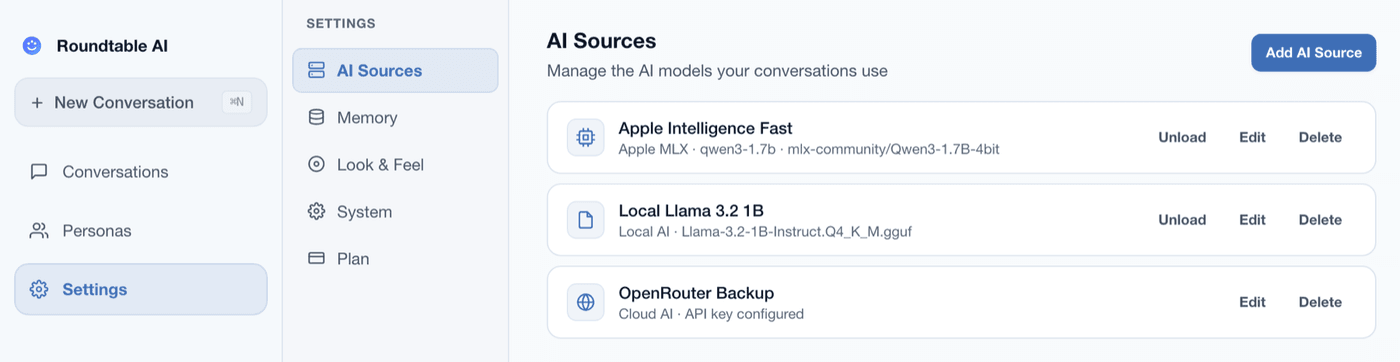
Your models. Your Mac.
Your data stays home.
Run GGUF language models entirely on your Mac with Apple Silicon Metal GPU acceleration. No internet required. No data leaves your machine. Mix local and cloud agents in the same multi-agent session.
What "local inference" means in Roundtable AI
When you load a GGUF model in Roundtable AI, the entire inference pipeline runs on your Mac. Here is what happens under the hood.
GGUF format
GGUF is a single-file format for quantised LLMs. Download one .gguf file from Hugging Face and point Roundtable AI to it. No Python environment, no Docker, no dependency installation.
Metal GPU acceleration
Inference runs on Apple Silicon's Metal GPU, not CPU-only. Roundtable AI uses the unified memory architecture of M1/M2/M3/M4 chips to keep models GPU-resident for fast token generation.
Worker threads
Each loaded model runs in a dedicated worker thread, isolated from the UI. Token streaming is real-time — you see each agent think character by character without the app freezing.
No network calls
When running a GGUF model, Roundtable AI makes zero outbound network requests. Your prompts, responses, and session data stay on-device. Airplane mode works fine.
Hardware guidance
Roundtable AI reads your Mac's unified memory at launch and warns you before you overload it. Here is what to expect at each RAM tier.
| Unified Memory | What you can run | Multi-agent capacity | Fit |
|---|---|---|---|
| 8 GB | A single 3B model (e.g., Phi-3 Mini Q4) leaves little headroom. Tight for multi-agent sessions. | 1 local agent + cloud agents via OpenRouter | Tight |
| 16 GB | Two 3B models simultaneously, or one 7B model (e.g., Mistral 7B Q4_K_M). Practical minimum for local multi-agent. | 2 local agents (3B) or 1 local (7B) + cloud agents | Minimum |
| 32 GB | Three to four 7B models at Q4 quantisation. Room for Llama 3 8B, Mistral 7B, and Gemma 2 9B at the same time. | 3-4 local agents on 7B models | Good |
| 64 GB+ | 13B and even 30B models become practical. Full 8-agent sessions with large local models. | 6-8 local agents, larger models | Ideal |
Three model sources, one session
Each agent in a Roundtable AI session picks its own model source independently. Mix all three in the same conversation.
Local GGUF
Point to any .gguf file on your Mac. Inference runs on-device with Metal GPU. Supports models from Hugging Face: Mistral 7B, Llama 3 8B, Gemma 2, Phi-3, and anything else in GGUF format. Complete privacy — no network calls. New here? See choosing a local model.
OpenRouter
One API key unlocks GPT-4o, Claude, Llama, Mistral Large, and 100+ cloud models. Useful when you want frontier-level reasoning alongside local models, or when your Mac lacks the RAM for more local agents.
100+ modelsOllama
If you already use Ollama, Roundtable AI auto-detects the running instance and lists every model you have downloaded. No extra configuration. Select a model and assign it to an agent.
Auto-detectA typical power-user setup: one agent on a local Mistral 7B for speed and privacy, another on GPT-4o via OpenRouter for complex reasoning, and a third on an Ollama-hosted Llama 3 for comparison. All three respond to each other in the same conversation. See how this compares to a single-model chatbot in Roundtable AI vs. ChatGPT.
Privacy by architecture
Privacy in Roundtable AI is not a toggle — it is a consequence of where the computation happens.
Local = nothing leaves your Mac
When you use a GGUF model, inference runs entirely on-device. Prompts, responses, and session history never touch a server. Airplane mode works.
API keys in Keychain
OpenRouter API keys are stored in the macOS Keychain, not in plain-text config files. The same credential store your system trusts for passwords and certificates.
No telemetry
Roundtable AI sends no analytics, usage data, or crash reports to HighRoad Software. There is no account system. There are no tracking pixels.
Local SQLite storage
All session data is stored in a local SQLite database on your Mac. Export to Markdown, JSON, HTML, or PDF at any time. Nothing is cloud-synced.
Getting started with local models
Three steps. No terminal. No Python. No Docker.
Download a GGUF model
Go to Hugging Face and download a .gguf file. Good starting points: Mistral 7B Instruct Q4_K_M (~4.1 GB), Llama 3 8B Q4_K_M (~4.7 GB), or Phi-3 Mini Q4 (~2.2 GB). Not sure which one? Read choosing a local model. Save it anywhere on your Mac.
Point Roundtable AI to it
Open Roundtable AI, go to Settings → Models, and add a Local GGUF connection. Select your .gguf file. The app validates the file, reports the estimated memory usage, and loads it onto the Metal GPU.
Assign it to agents and go
Create a new session, pick your personas, and assign the local model to one or more agents. Mix with OpenRouter or Ollama agents in the same session. Hit start — agents begin responding immediately, token by token.
Frequently asked
ollama pull is available immediately — no extra configuration. Select an Ollama model and assign it to an agent the same way you would a GGUF file or an OpenRouter model.
Try local inference today
Roundtable AI is free on the Mac App Store. Download a GGUF model, point the app to it, and run your first local multi-agent session in under a minute.