Feature Deep Dive

You run the room. Not the AI.

Eight director controls let you intervene at any point in a multi-agent discussion — pause, steer, challenge, and synthesize without losing context.

Human-in-the-Loop AI

Why director controls matter

Autonomous multi-agent discussions sound impressive until you see the output. Without human intervention, agents drift off-topic, reinforce each other's blind spots, and produce vague consensus that nobody can act on. The conversation goes somewhere — just not where you needed it to go.


Director controls give you a seat at the table without breaking the flow. You stay in the room as the conversation unfolds, intervening only when it matters: redirecting a tangent, forcing a weak argument to be defended, adding context the agents don't have, or calling for a structured summary when the discussion has run its course. The result is AI debate that actually converges on useful conclusions — because a human was guiding it. This works with any model source: local GGUF models, OpenRouter, or Ollama.

The Intervention Layer

The eight controls

Each control targets a specific intervention. Use one, use all eight, or let the discussion run untouched — it's up to you.

Pause / Resume

Stop the discussion mid-turn and resume exactly from the saved state. Nothing is lost — every agent picks up where they left off.

Use when you need time to think, read a long response carefully, or step away from the session.

Inject

Add a Director message that becomes visible to all agents as shared context. It enters the conversation without taking an agent's turn.

Use when agents are missing critical information — a new data point, a constraint they don't know about, or a clarification of the original question.

Elaborate

Ask a specific agent to expand on their last point. They get an extra turn to go deeper without the conversation moving on.

Use when an agent drops an interesting claim but doesn't develop it — and you want the detail before the next speaker buries it.

Challenge

Force an agent to reconsider or defend their position. The agent must address the challenge directly before contributing anything new.

Use when the room is converging too quickly on a weak argument and nobody is pushing back.

Spotlight

Override the turn strategy and pick exactly who speaks next. Works with any discussion mode — Round Robin, Moderator, Vote, or Dynamic.

Use when you know a specific agent has the right perspective for this moment, but the turn order wouldn't reach them in time.

Skip

Pass an agent's turn and move the conversation forward. The skipped agent stays in the session and will speak on their next turn.

Use when an agent is repeating themselves or when you want to accelerate to a more relevant speaker.

Constrain

Apply a temporary rule that all agents must follow in future turns. The constraint stays active until you remove it or the session ends.

Use when the discussion needs guardrails — "stay under 100 words", "cite specific numbers", or "focus only on the legal implications".

Conclude

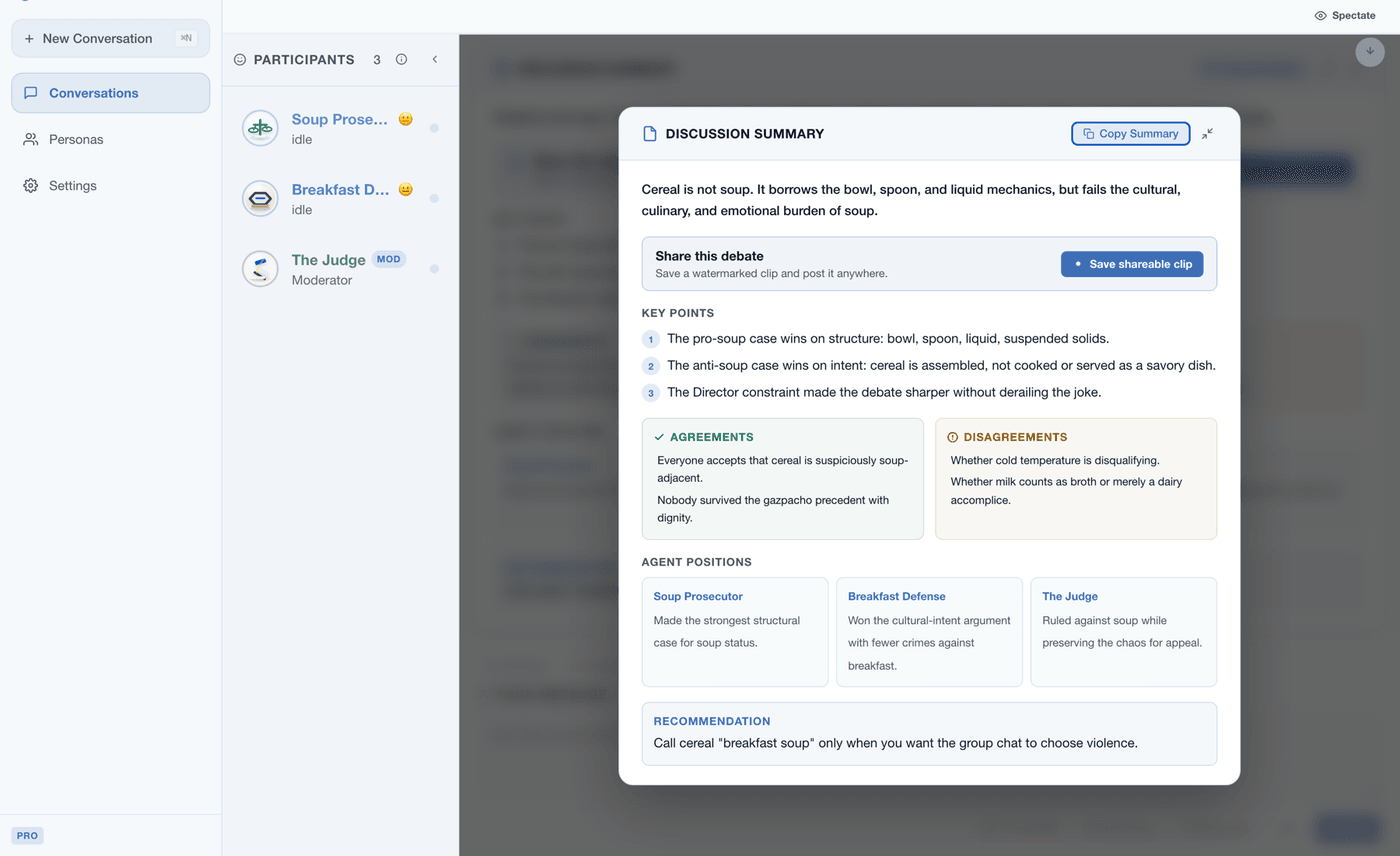
Trigger a structured synthesis from any agent you choose. The summary covers agreements, disagreements, open questions, and suggested next steps.

Use when the discussion has run long enough and you need an actionable summary to share with your team.

In Practice

Example: directing a strategy debate

A product manager runs a 5-agent session on whether to enter the European market. Here's how director controls shape the outcome.

1

Agents debate for 4 rounds, then start looping on the same GDPR concerns. You hit ⏸ Pause.

You review the transcript so far and realize nobody has considered the partnership angle. The discussion is stuck.

2

You use 📌 Inject to add context: "We have a preliminary partnership offer from a Berlin-based distributor. Consider this in your analysis."

All agents now see this as a Director message in their context. The conversation has new material to work with.

3

The Optimist immediately endorses the partnership. You use ⚡ Challenge on the Optimist: "What's the downside of depending on a single distributor in a new market?"

The Optimist is forced to address the risk before making their next point. No more unexamined enthusiasm.

4

You use 🎯 Spotlight to give the Legal Analyst the next turn — they haven't spoken about the partnership yet.

The Legal Analyst flags contract structure issues nobody else raised. Without Spotlight, the turn order would have gone to the Finance Advisor first.

5

After 2 more rounds, the discussion has converged. You use ✓ Conclude and pick the Analyst to write the synthesis.

The final summary lists 3 agreements, 2 unresolved risks, and a recommended 90-day evaluation plan. You export it as Markdown and share it with your team.

After the Discussion

Export and share

Every directed session — including your interventions, agent responses, and the final synthesis — can be exported in four formats. Your Director messages and control actions are preserved in the transcript.

Markdown JSON HTML PDF
Questions

Frequently asked questions

Yes. Use Inject to add a Director message that all agents see as shared context, or use Constrain to apply a temporary rule that redirects future turns. Both let you change the topic without restarting the session.
Full state is preserved. Every agent's context, the turn order, active constraints, and the discussion phase are all saved. Resume exactly where you left off — no context lost, no need to re-explain anything.
Yes. Spotlight overrides the current turn strategy — whether it's Round Robin, Moderator, Vote, or Dynamic — and designates the next speaker. The normal turn order resumes after the spotlighted agent finishes.
Conclude triggers a structured summary from any agent you choose. The synthesis covers points of agreement, disagreements that remain unresolved, open questions, and concrete next steps. You can then export the result in Markdown, JSON, HTML, or PDF.

Direct your first AI debate

Roundtable AI is free on Mac. Set up agents, start a discussion, and use director controls to guide it — in under two minutes.

Download Free on Mac