Name, extension, folder, min/max size, created or modified date window, Finder tags, content phrase. Build it visually, write it as a boolean expression, or let the visual blocks compile to text for you.
Native macOS · Public TestFlight beta
File search and disk inspection from the Mac menu bar.
Tell ScoutBar what you remember with its current English query controls: a name, a phrase, a date, a size, a folder or a tag. Find the right file, see what is taking space, then review items before moving them to Trash.
Local index · No account required · Review before cleanup · Public beta interface currently in English
Native SwiftUI
Local indexing
Apple Silicon + Intel
Trash-safe cleanup
At a glance
What is ScoutBar?
ScoutBar is a native Mac menu-bar utility for finding files by name, metadata or text inside supported documents. It also maps disk usage and moves reviewed cleanup items to Trash; its index and file content stay on the Mac.
- Platform
- macOS 13 Ventura or later; Apple silicon and Intel
- Best for
- Finding half-remembered files, understanding disk usage and reviewing cleanup
- Processing
- Chosen folders are indexed and searched locally
- Availability
- Public TestFlight beta; public Mac App Store listing not yet live
Product facts and public-beta status reviewed on . See the verification method and corrections policy.
Why ScoutBar
Search and disk tools
ScoutBar is built for the moments where a file is hard to surface with a filename-only lookup. Three patterns shape the current build:
The half-remembered file
"It was a PDF. From spring. Something about invoicing."
Combine an extension, a content phrase, and a date window in one query. ScoutBar shows you the snippet inline, so you can pick the right one without opening five.
The disk that just won't shrink
"My Mac says I have 8 GB left and I don't know why."
Switch to the disk explorer, see your folders as a treemap or sunburst, drill into the offender, and review caches and build artifacts with explicit safe / review / blocked labels.
The "is this safe to delete?" anxiety
"I'm not deleting anything from Library/. I'll just buy a bigger SSD."
The cleanup assistant only auto-selects items it explicitly classifies as safe. Risky paths are blocked outright. Every action goes to Trash with a confirmation that shows the size and first items.
How it differs
Available modes
Spotlight is the built-in place to start for everyday lookup and system actions. Alfred and Raycast are broad keyboard launchers with their own workflows and extensions. ScoutBar’s public beta focuses on a narrower workflow: chosen-folder search, disk inspection and review-before-Trash cleanup.
Read the source-led Spotlight and DaisyDisk decision guide. For current third-party capabilities, consult Apple’s Spotlight guide, Alfred’s site and Raycast’s site. Product names are trademarks of their respective owners.
Everyday Mac power
How the app works
ScoutBar is not trying to replace Finder. It is the little command center you open when Finder is too visual, Terminal is too much, and Spotlight is too vague. Search by the details you actually remember, then act on the result with confidence.
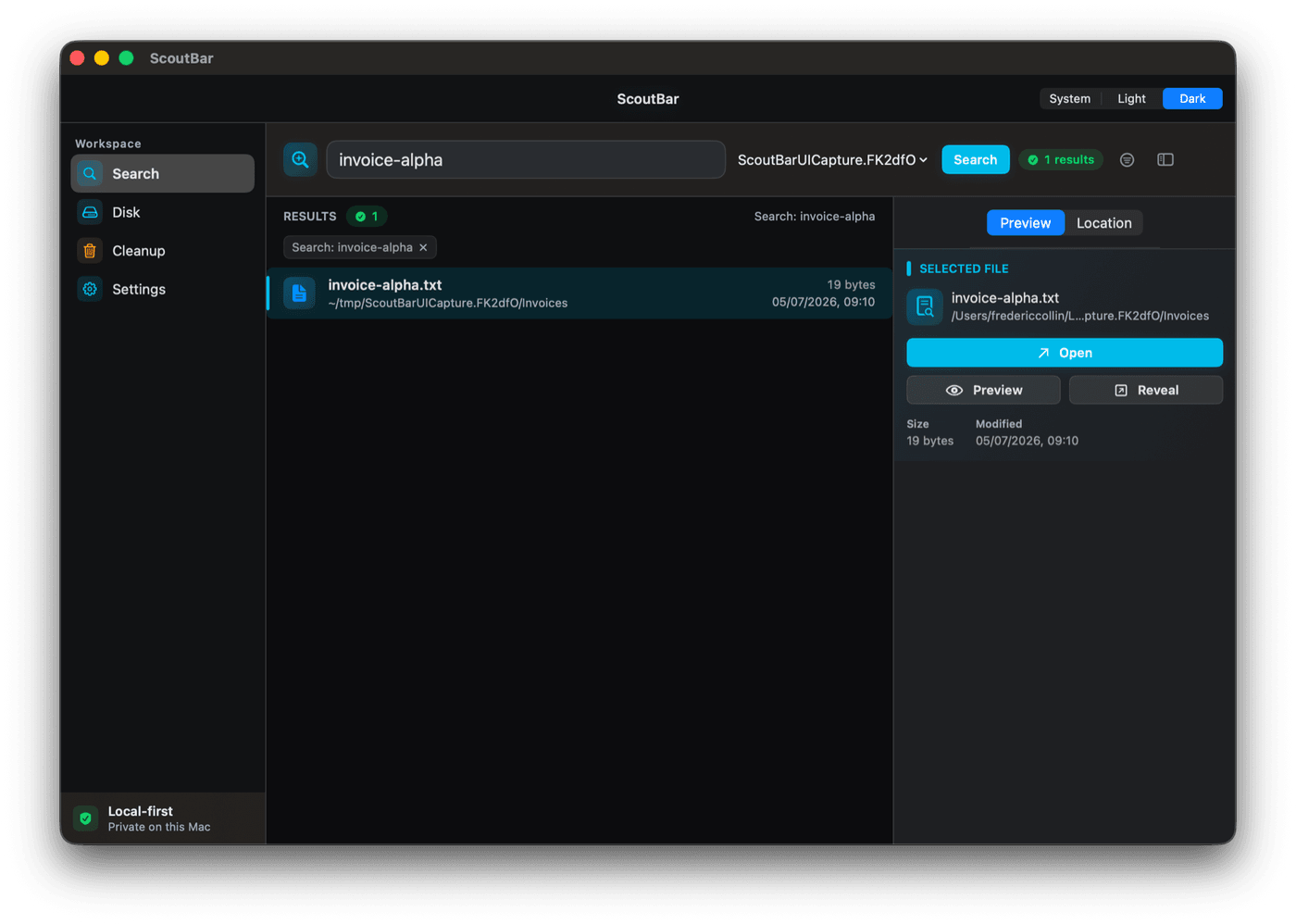
Indexed search reads inside PDF, DOCX, and text files. The matching phrase is highlighted in a snippet, so you can identify the right document without opening anything.
Switch between list, treemap, and sunburst views. Drill into oversized folders, generated build artifacts, and the downloads that quietly grew legs since you last looked.
Safe / review / blocked classification on every candidate. Bulk Move to Trash always confirms, lists what it will move, and never permanently deletes. You can always restore from Trash if you change your mind.
ScoutBar indexes only the folders you choose, stores everything locally, and refuses to index secret material like .env, .ssh/, AWS credentials, or private keys.
One click on the menu bar icon. Search. Reveal in Finder. Close. A utility should earn its menu bar slot every time it appears — this one does.
Who uses ScoutBar
Local processing
Developers
Find that one config file by content phrase across a year of repos. Hunt down build artifacts and node_modules graveyards.
Writers & researchers
Locate a quote across hundreds of PDFs, Markdown notes, and DOCX drafts — without leaving the menu bar.
Designers
Hybrid queries by extension, tag, and size to surface the right asset out of thousands of exports.
Founders & consultants
Find the contract, the invoice, the deck — by what's inside it — and reveal it straight in Finder in seconds.
A closer look
Platform integration
Every screen below comes from the current ScoutBar Mac build.
Filter by name, extension, content, and date. The matched phrase is highlighted in the result row.
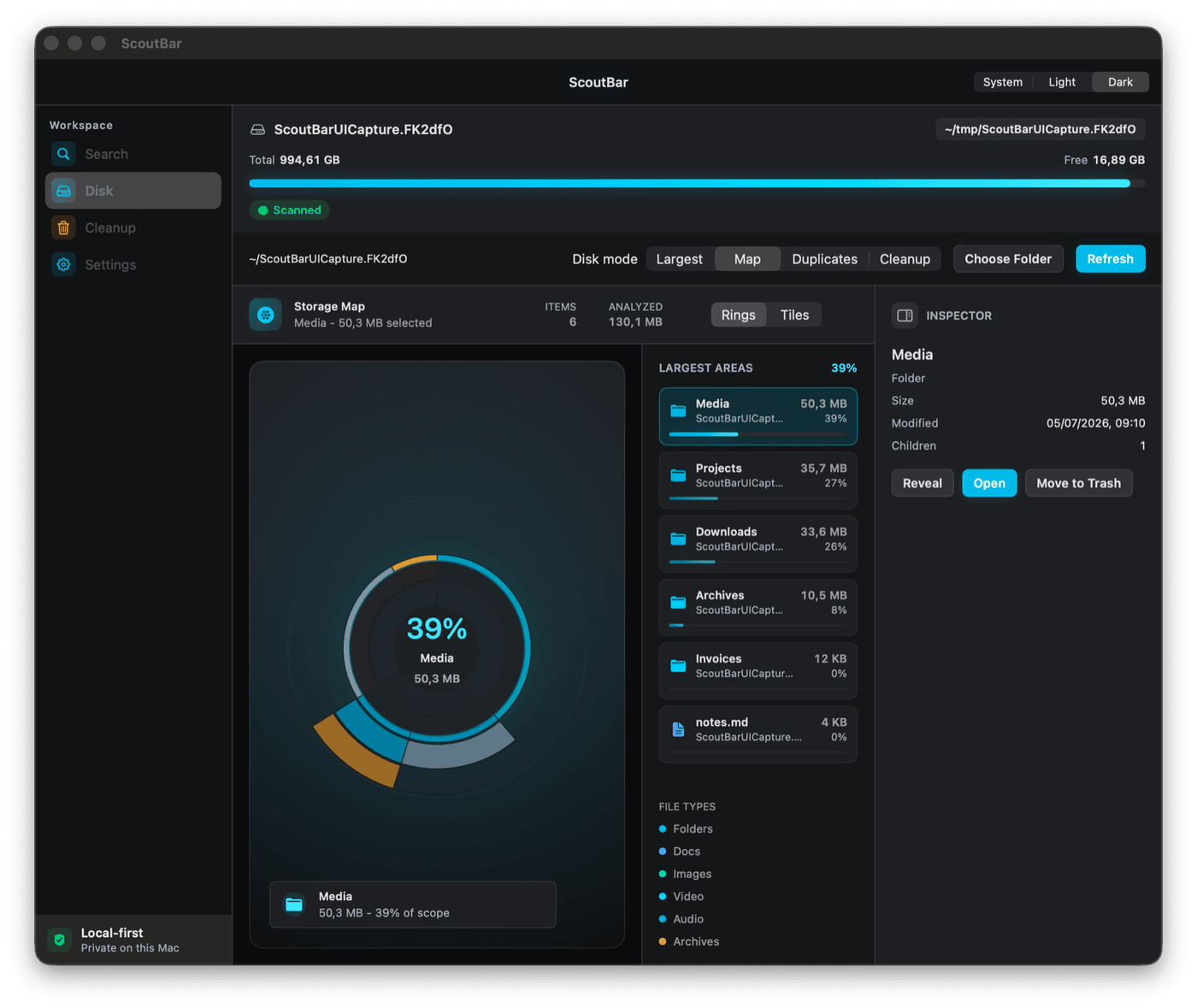
Drill into the actual offender. Sunburst view is one click away.
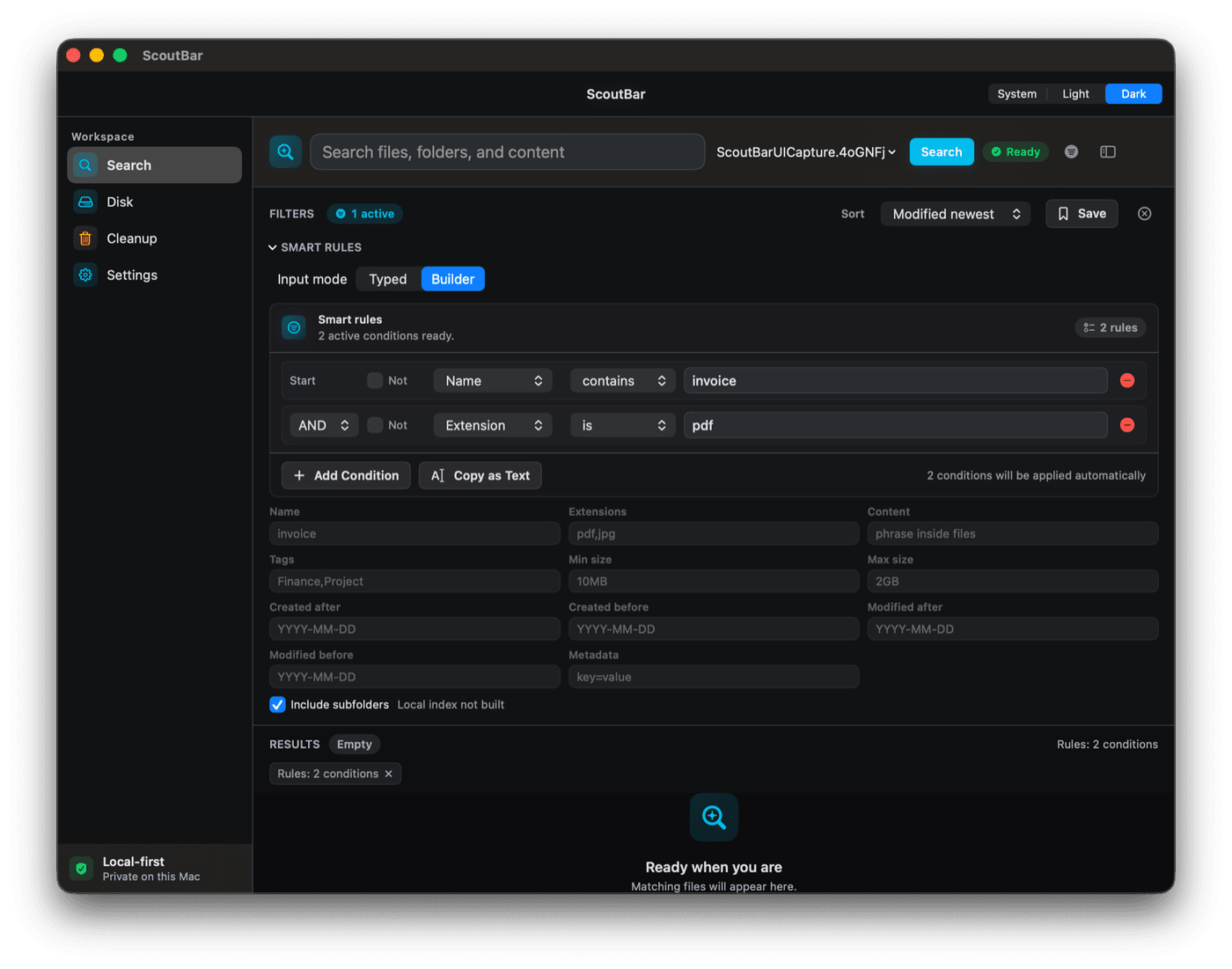
Compose visually or write the expression — both produce the same query.
Honest pricing
Price and purchase options
The repository currently plans fast metadata search at no cost, with content search, hybrid queries, the disk explorer, and the cleanup assistant in a one-time Pro unlock. The live Store sheet will control the final offer.
ScoutBar Free
Planned free core
Fast file search in your menu bar.
- Search by name, extension, folder, size, dates
- Spotlight scope across "This Mac"
- Reveal in Finder, native shortcuts
- Private by default — no account, no tracking
ScoutBar Pro
Planned one-time unlock
TBA at Mac App Store launch
The current repository plan is one in-app purchase, subject to the live Store sheet.
- Content search inside PDF, DOCX, and text files
- Hybrid boolean queries (visual + manual builder)
- Disk usage explorer — list, treemap, sunburst
- Cleanup assistant with safe/review/blocked review
- Indexing controls — Lean, Balanced, Power modes
- Finder tag filtering and metadata rules
Private by design
Data handling and privacy
What ScoutBar does
Works only with files and folders you explicitly grant access to. Access is stored through macOS security-scoped bookmarks. The search index lives on the device.
- Local-only search index, on your Mac.
- No account required to use the app.
- StoreKit handles Pro unlock through Apple.
What ScoutBar does not do
The app does not collect analytics, run ad SDKs, or upload your files. It refuses to index obvious secrets (.env, .ssh/, private keys, AWS credentials) even if you accidentally point it at them.
- No tracking, no ads, no third-party analytics.
- No cloud upload of file names, paths, snippets, or document text.
- No call-home telemetry in the documented sandboxed release build.
Common questions
Product limits
How is ScoutBar different from Spotlight?
Spotlight is the built-in starting point for everyday Mac lookup. ScoutBar’s public beta adds chosen-folder indexing, supported-document content search, disk inspection and review-before-Trash cleanup in one menu-bar utility.
Does ScoutBar send my files to the cloud?
No. ScoutBar indexes only folders you choose, stores the index on your Mac, and never uploads file names, paths, content snippets, or document text to HighRoad Software. There is no account, no telemetry, and no advertising SDK.
Is ScoutBar available now?
Yes — ScoutBar is available as a public TestFlight beta. The public Mac App Store listing is not live. The beta interface and saved-query vocabulary are currently English-only; the website’s localized pages do not change the app interface.
What does ScoutBar Pro unlock?
The current beta plan places supported-document content search, Boolean queries, disk inspection, cleanup review and index controls in Pro. The live Store sheet will confirm final scope and regional terms.
Can ScoutBar accidentally delete a file?
The current cleanup flow presents a confirmation and moves selected items to Trash rather than permanently deleting them. Review the listed items before confirming.
Will ScoutBar work on my Mac?
ScoutBar targets macOS 13 Ventura and later on both Apple silicon and Intel Macs. It is available as a public TestFlight beta; the public Mac App Store listing is not live.
Does ScoutBar index my whole disk?
No. You explicitly choose which folder ScoutBar indexes; everything else is searched live or via Spotlight. You can switch between Lean, Balanced, and Power indexing modes, and FTS/cache budgets are configurable.
What about secret files like .env or SSH keys?
ScoutBar explicitly refuses to read or index files with names or paths that look like credentials: .env, .netrc, id_rsa, .aws/, .ssh/, .gnupg/, .pem, .key, .p12, and similar — even if they happen to be inside a folder you indexed.
From the same studio
Related HighRoad products
The team behind ScoutBar also makes a private document-research app, a market-research desk, and a multi-agent thinking surface. Each product page states its own processing model, release channel, and current commercial status.
Launch status
Beta access
ScoutBar is available through TestFlight. The public Mac App Store listing is not live. The beta interface and saved-query vocabulary are currently English-only; this website is also available in French, German, Spanish and Dutch.
One email at launch. No newsletter, no tracking pixel, no sharing — your address opens your mail client and goes straight to support@highroadsoftware.com.