LumenForge app icon

LumenForge  ·  macOS  ·  Apple Silicon

Generate images.
On your Mac.
No cloud.

Stable Diffusion, FLUX, Wan 2.2 video — 18+ model architectures with Metal GPU acceleration. The Python runtime ships inside the app. Nothing leaves your machine.

macOS 13 or later  ·  Apple Silicon (M1+)  ·  No account required

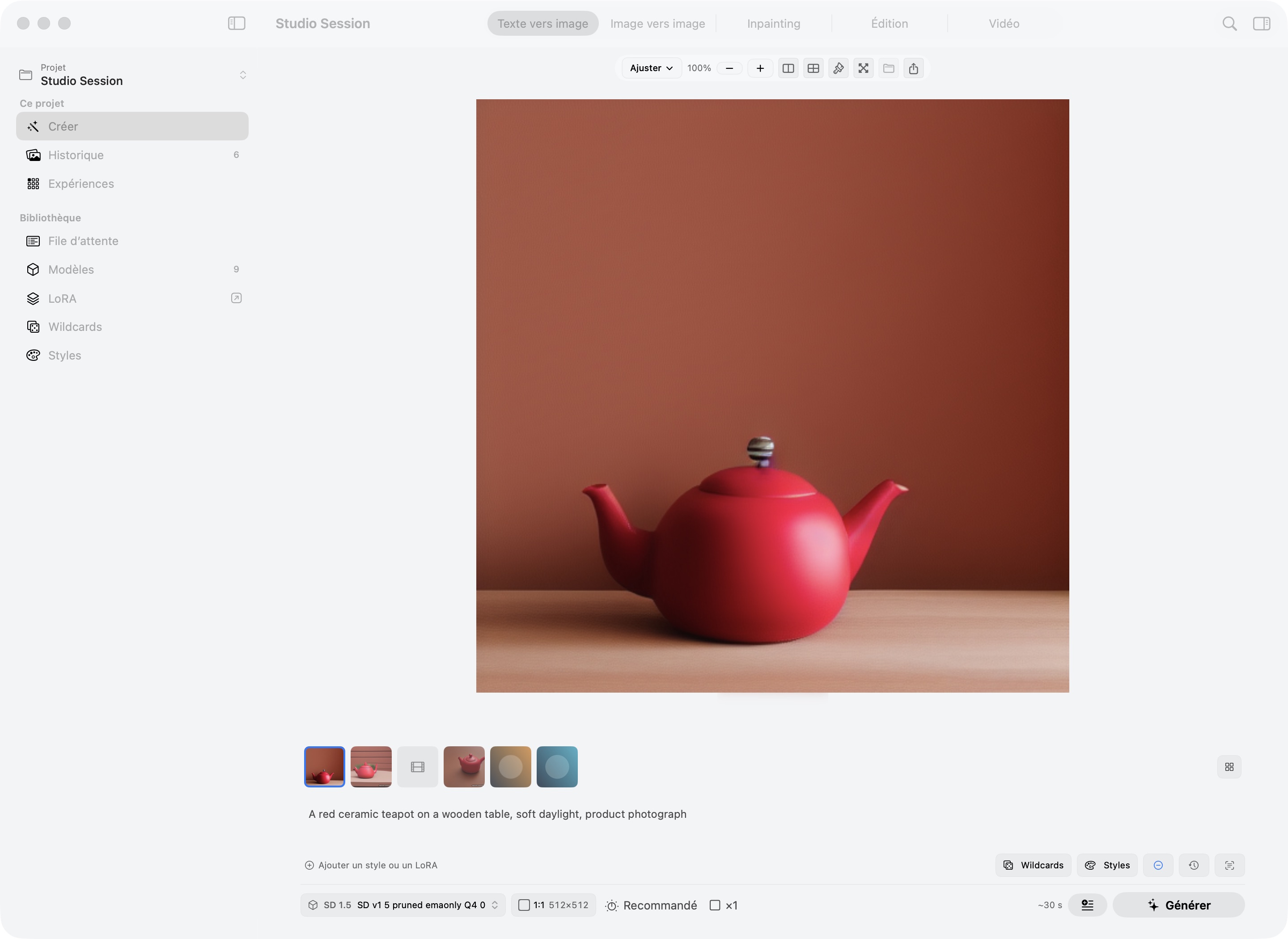
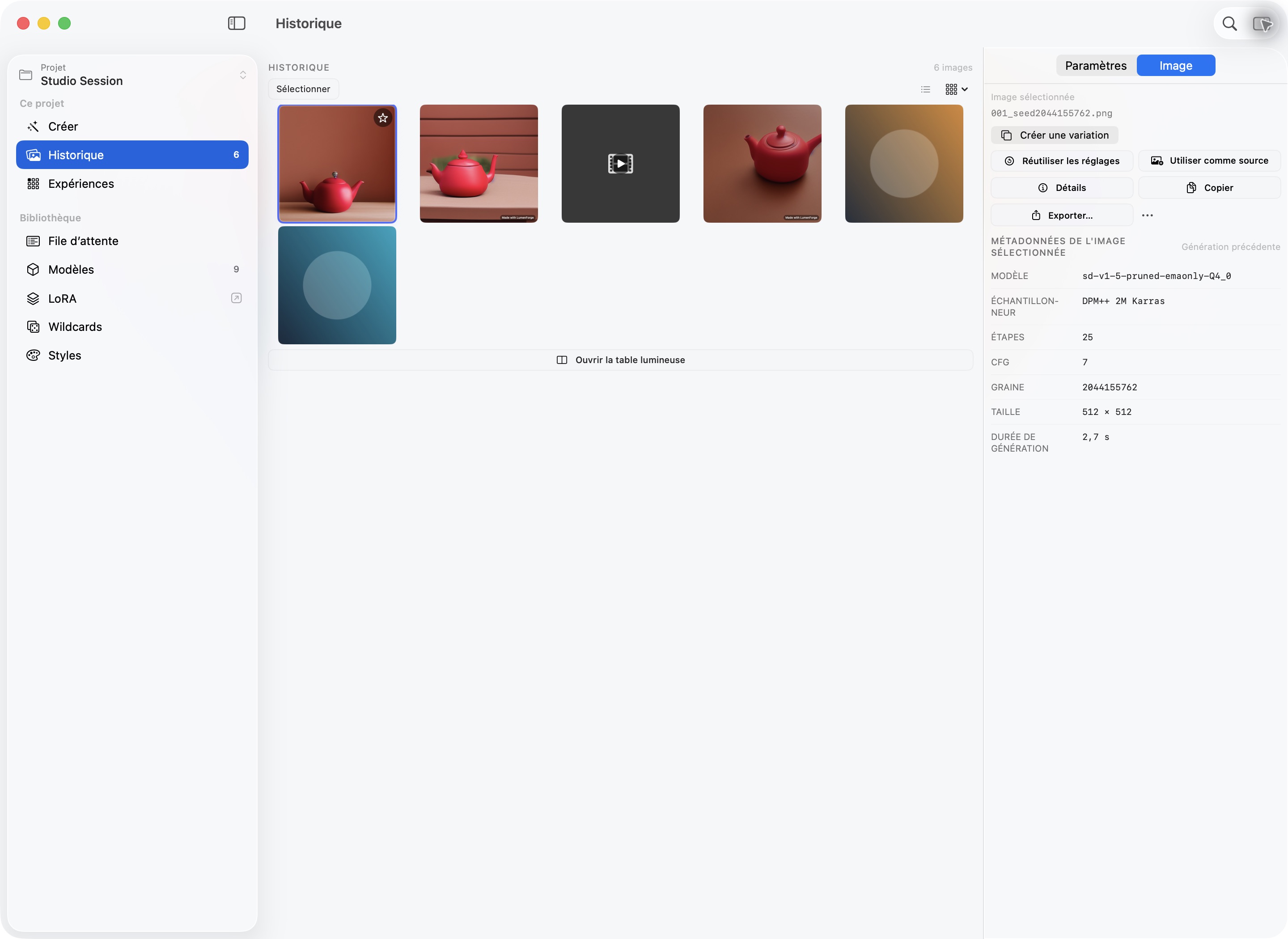
LumenForge interface showing prompt controls, generated images, and history panel
18+
Model architectures supported
Local
100% on-device, Metal GPU
Zero
Cloud calls, accounts, or telemetry
Free
Mac App Store · No credit card

Everything you need
to generate at full power

Most local image tools ask you to configure Python environments or tolerate web-based UIs. LumenForge is a proper macOS app that handles everything — from model detection to Metal GPU routing — so you can focus on generating.

Generation Engine

Every parameter, nothing hidden

Text to image. Image to image. Inpainting. All in the same workflow. The controls are full-featured without being overwhelming: sampler selection, step count, CFG scale, resolution up to 8192px, seed locking, batch generation, custom VAE override. Simple Mode is there if you want fewer knobs — full mode when you need them all.

  • 10+ samplers: Euler, DPM++ 2M/SDE, DDIM, UniPC, LCM, and more
  • Inpainting with a native mask editor — paint directly on your image
  • Batch generation with seed variation or fixed seed across a run
  • CFG scale 0–50, steps 1–200, CLIP skip 1–12
  • Tiled VAE for large resolution outputs without memory errors
  • Custom VAE override per generation
Text to Image Generate PROMPT A woman in a sunlit garden, impressionist painting style, soft bokeh FLUX Kontext (dev) DPM++ 2M · 28 steps CFG SCALE 7.5 SEED · 🔒 LOCKED RESOLUTION 1024 × 1024 Next in queue

Model Ecosystem

18+ architectures. Three inference engines.

LumenForge supports every major model released in the last three years and routes each to the right inference engine automatically. Drop a safetensors file — it uses diffusers or mflux. Drop a .gguf — it goes to stable-diffusion.cpp with Metal. Drop an MLX archive — native Apple Silicon inference. You don't configure any of this.

  • FLUX dev, schnell, Kontext — state-of-the-art image quality via mflux
  • SDXL and SD 1.5 — broad LoRA ecosystem, fast iteration
  • Wan 2.2 and LTXV — text-to-video and image-to-video, local
  • GGUF quantized models — run large models (4-bit, 8-bit) on less RAM
  • MLX format — Apple Silicon native, fast and memory-efficient
  • Chroma, Lumina 2, Qwen Image, ERNIE, Z-Image, and more
FLUX SDXL Wan 2.2 LTXV GGUF MLX +12 more
Model Library + Add F FLUX Kontext Safetensors · 23.8 GB · Reference-conditioned FLUX XL SDXL 1.0 Base Safetensors · 6.9 GB · 2 LoRAs active SDXL Wan 2.2 (T2V) Safetensors · 14.2 GB · Video generation VIDEO Q8 FLUX.1-dev Q8_0 GGUF · 8-bit quantised · 9.8 GB · Metal GPU GGUF Q8 1.5 v1-5-pruned-emaonly.safetensors SD 1.5 · 3.97 GB

Edit Mode & Advanced Workflows

Reference images, ControlNet, LoRA, video

Edit Mode — available on FLUX Kontext, FLUX 2, Qwen, and Z-Image — lets you generate using reference images as visual anchors. The model attends to your references rather than blending them, so you get coherent outputs even when the prompt pushes in a new direction. For structure control, ControlNet guides generation with Canny edges, depth maps, or pose estimation.

  • Edit Mode: reference-conditioned generation, up to multiple input images
  • ControlNet: Canny edge, MiDaS depth, OpenPose preprocessors
  • LoRA blending: load multiple LoRAs, adjust per-weight strength
  • Wildcards: define variable prompt lists for batch variation
  • Video: T2V and I2V with Wan 2.2 and LTXV — queue overnight, no timeout
  • Prompt Enhancer: expand prompts locally with Ministral-3 (optional)
Edit Mode FLUX Kontext REFERENCE IMAGES Reference 1 Reference 2 + OUTPUT ACTIVE LoRAs portrait-v3 0.75 lighting-xl 0.50 Prompt wildcards: {sunrise|golden hour|soft morning} · Batch 4× Video: Wan 2.2 T2V · 4 sec · 24fps

Privacy & Architecture

Your Mac, your models, your images

LumenForge ships a full Python 3.11 runtime inside its app bundle. When you open the app, the backend starts on your machine and listens on localhost — nowhere else. There is no LumenForge server. Your prompts, your model files, your generated images: none of it goes anywhere you didn't put it yourself.

  • Bundled Python 3.11 — no pip install, no conda, no setup scripts
  • Backend communicates over localhost only — App Sandbox enforced
  • No account, no login, no telemetry of any kind
  • Models you download once work forever — no expiry, no API policy changes
  • All generation history stays in ~/Library/Application Support/LumenForge
  • Notarised by Apple, reviewed on the Mac App Store
Architecture · Localhost Only YOUR MAC SwiftUI Frontend Prompt, History, Canvas localhost Python 3.11 Backend FastAPI · SSE progress stream mflux FLUX family diffusers + MLX SDXL, SD 1.5… sd.cpp (Metal) GGUF quantised No outbound connections · App Sandbox · Notarised

Up and running in three steps

No Python installation. No virtual environment. No shell scripts. One download, and you're generating.

1

Install LumenForge

Download from the Mac App Store or directly from highroadsoftware.com. The app bundle includes a complete Python 3.11 runtime with all inference dependencies — nothing to install separately. Open the app and the backend starts automatically.

2

Add your models

Download model files from Hugging Face or Civitai and place them in your models folder. LumenForge scans on launch, reads the metadata, and detects the architecture and format automatically — safetensors, GGUF, or MLX. No manual configuration required.

3

Generate

Write a prompt, pick a model, set your parameters, and hit Generate. Results appear in the canvas. Every image is saved to your history automatically. Use workspaces to keep separate projects organised — portraits, landscapes, a specific client brief — without mixing their histories or settings.

Core runtime stays lean.
Add what you need.

The Mac App Store build installs the core generation engine. Three optional packs extend it — each downloaded on first use or pre-bundled in the direct distribution build.

ControlNet Preprocessors

Canny edge, MiDaS depth, and OpenPose preprocessors for guided generation. Give the model a structure to follow — useful for consistent composition, character poses, and architectural layouts.

SD 1.5 & SDXL

AI Upscaler

RealESRGAN 2x and 4x upscaling for any generated image, with optional GFPGAN face enhancement. Runs locally — no cloud API, no file uploads. Upscale portraits and landscapes to print-ready resolution in seconds.

All models

Prompt Enhancer

Runs Ministral-3 locally to expand and refine your prompts before generation. Useful when working with ERNIE Image models, or when you want the model to fill in craft details you haven't specified.

ERNIE & compatible

All packs run entirely on your machine. None of them send data anywhere.

Common questions

Your Mac can do this.
It just needs the right app.

Free on the Mac App Store. Direct download includes ControlNet preprocessors, AI upscaling, and prompt enhancement. No account. No generation limits.

Download on the Mac App Store
Direct Download

Requires macOS 13 or later  ·  Apple Silicon (M1+)  ·  16 GB RAM minimum