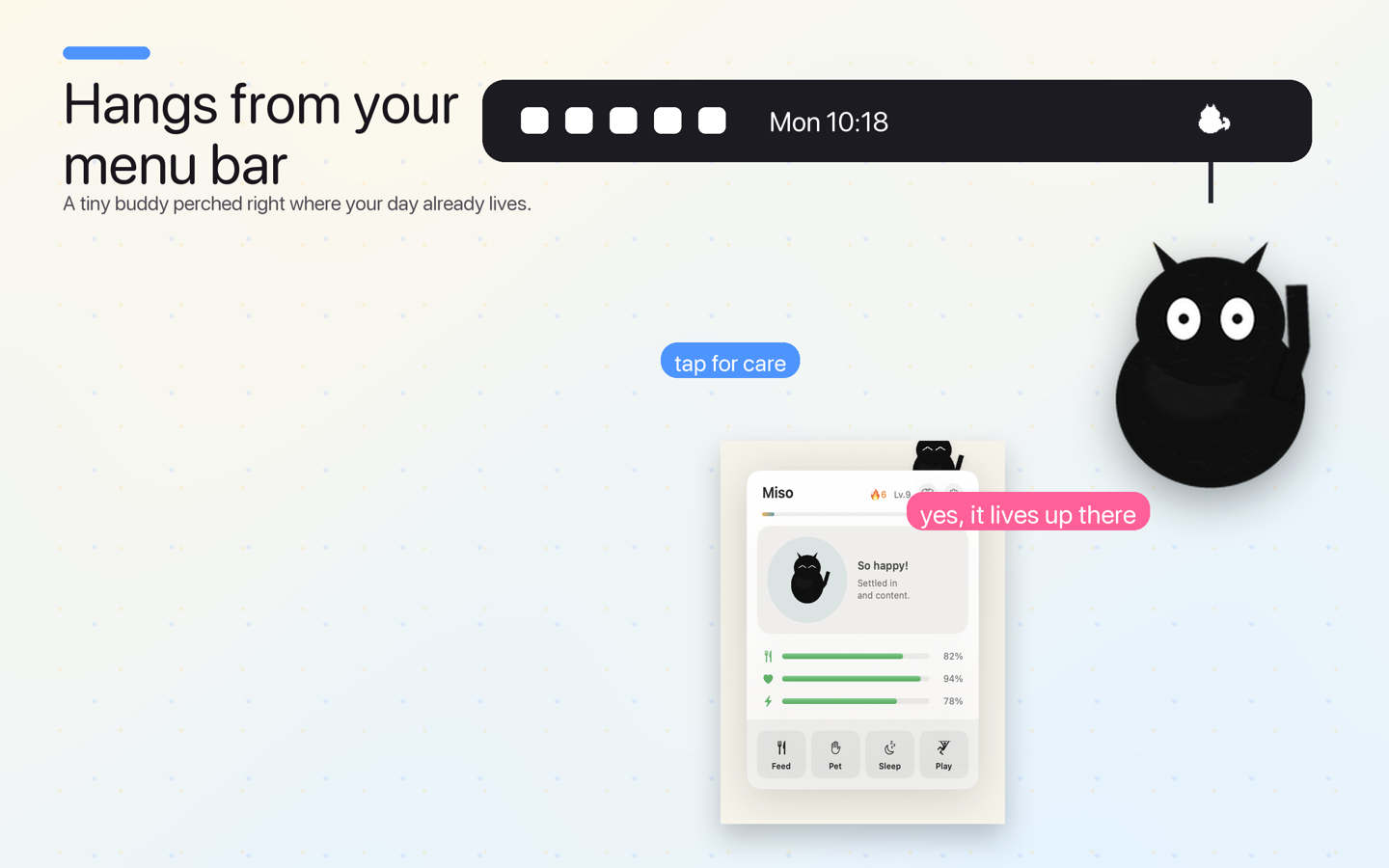
Hangs beneath your menu bar
The default. The cat parks itself quietly under the menu bar and keeps you company while you work — blinking, yawning, grooming, and dozing. Tap it for an action bubble: feed, pet, or send it to sleep.
Let it hang quietly beneath your menu bar, drift after your cursor, stretch on an elastic leash, or bounce around with real physics. Tap, pet, feed, and fling it — or turn your own photo into a living pet. Cat Fidget is the cozy desktop companion macOS has been missing.
At a glance
Cat Fidget is a free, native Mac menu-bar pet: a small cat you can pet, feed, drag, fling and dress up. Version 1.0.2 is the current public download. It runs its care loop, physics and photo-pet processing on the Mac, with no account, ads, analytics or tracking.
Next update — V2: Play becomes a fifth behaviour. Optional Quiet Gifts are silent and off by default. Daily Pawprints keep only Cat Fidget interaction counts on this Mac for 14 days—never app names, content, keystrokes or cursor paths. V2 is being prepared for App Store review and is not the live download yet.
Public version, V2 candidate status, privacy, compatibility and purchase disclosure checked on . View the live Mac App Store listing.
Cat Fidget runs as a tiny floating window — never a Dock icon, never a full-screen overlay. Pick the behavior that fits your mood and switch any time from the menu-bar paw.
The default. The cat parks itself quietly under the menu bar and keeps you company while you work — blinking, yawning, grooming, and dozing. Tap it for an action bubble: feed, pet, or send it to sleep.
A gentle nod to the classic Neko. The cat ambles after your pointer across the desktop, pausing to sit and clean itself when you stop moving. Present, never in the way.
The cat is tethered to the menu bar by an invisible elastic. Drag it anywhere on screen and let go — it stretches, snaps, and bounces all the way back home. Endlessly satisfying.
Full 2D physics with gravity and squash-on-impact. Grab the cat, fling it hard, and it tumbles across your displays — bouncing off the screen edges with a satisfying haptic tap on every wall.
Native SwiftUI. Apple Silicon-optimised. Haptics on supported trackpads. Multi-monitor aware. No web view, no Electron, no nonsense.
Pure SwiftUI and AppKit — tiny on disk, light on your battery, fully Apple Silicon-native. No Electron, no web view.
Real gravity, real velocity, real squash-and-stretch on every wall impact.
Trackpad taps when the cat bounces, hits, or purrs. Silently no-ops on non-haptic hardware.
Fully localized — from English, French, and German to Japanese, Chinese, Arabic, and more. Your cat feels at home anywhere.
A discrete orange paw in the menu bar when stats run low. Optional local notifications. No spam.
Bounces correctly across multiple monitors. Survives Spaces, Mission Control, lock screen.
Cat Fidget is intentionally small on screen, but the app surface is complete: behavior modes, a gentle care panel, Custom Photo Pet, and optional cosmetic coats that never affect gameplay.


Cat Fidget is fun in ten seconds. Keep it that way in Casual mode, where stats drift gently and nothing has consequences. Or flip on Devoted mode — the tamagotchi-style care loop — where the things you already do (petting, feeding, playing) are exactly what keep your cat well.
Miss your real cat while you work? Pick any photo and Cat Fidget lifts the subject cleanly out of its background using Apple's on-device Vision framework — then drops it onto your desktop as a living pet you can pet, drag, and fling like any other.
Every download includes the Classic Black cat. Custom Photo Pet desktop use is available as an optional one-time purchase. Behind that sits a 60-piece wardrobe — breeds, accessories, themed bundles — you can buy à la carte or unlock all at once with the Cat Lover Pass. Every purchase is a one-time cosmetic. No subscription, no gameplay locked behind it.
Breeds: Classic Black (free), plus Ginger, Tuxedo, Siamese, Calico, Russian Blue, Tabby, Persian, Scottish Fold, and Sphynx. Accessories cover hats, eyewear, neckwear, body wear, and wings. Bundles include Halloween, Christmas, Valentine, Summer, Gentleman, Pirate, and Royal. Cat Lover Pass holders get every future drop at no extra cost. All cosmetics are non-consumable and restorable across your Macs.
Desktop pets have been around since the original Neko. Cat Fidget keeps the charm and adds modern physics, a care loop, your own photo pet, and real macOS-native privacy.
| Cat Fidget | Classic “Neko” pets | Generic menu-bar widgets | |
|---|---|---|---|
| Lives in the menu bar (no Dock icon) | ✓ | ✕ | ✓ |
| Multiple behaviors (calm, follow, elastic, bounce) | ✓ 4 modes | Follow only | ✕ |
| Real 60 fps physics & fling | ✓ | ✕ | ✕ |
| Optional Devoted-mode (tamagotchi) care & leveling | ✓ | ✕ | ✕ |
| 60-piece wardrobe (breeds, accessories, bundles) | ✓ optional cosmetics | ✕ | ✕ |
| Turn your own photo into a pet | ✓ on-device | ✕ | ✕ |
| Trackpad haptics | ✓ | ✕ | Rarely |
| No account, no network, no tracking | ✓ sandboxed | Varies | Often phones home |
| Localized in 20 languages | ✓ | ✕ | Varies |
| Price | Free + optional cosmetics | Free / abandonware | Often subscription |
Every behavior, both care modes, and the Classic Black cat are included at no charge. Optional non-consumable purchases let you change your cat, use Custom Photo Pet on your desktop, or change its wardrobe — or you can unlock the whole wardrobe once with the Cat Lover Pass.
Optional non-consumable wardrobe items: breeds $1.99 · accessories $0.99 · themed bundles $2.99 · Cat Lover Pass $9.99 (unlocks everything). Some items change behavior. Nothing is required to enjoy the free app.
Cat Fidget is a native macOS app that puts a small interactive cat on your screen. It lives in the menu bar — there is no Dock icon. Let it hang calmly under the menu bar (Calm), follow your cursor Neko-style (Follow), stretch on an elastic leash (Elastic), or bounce around with physics (Bounce). Tap it, pet it, feed it, and fling it: it reacts with squash-and-stretch animation, soft sound, and haptics on supported trackpads.
Cat Fidget is a free desktop pet for Mac that lives in your menu bar. It has four on-screen behaviors — Calm, Follow, Elastic, and Bounce — an optional tamagotchi-style care loop (Devoted mode), a wardrobe of 10 breeds and 44 accessories, and a Custom Photo Pet that turns any photo into a living pet entirely on-device. The base app is free with no tracking and no network access.
Yes. Follow mode recreates the classic Neko behavior — the cat chases your cursor around the screen — then adds 60 fps physics, an elastic leash, squash-and-stretch animation, and your own photo pet. It's a modern take on the 1990s desktop cat.
Cat Fidget includes an optional tamagotchi-style care loop called Devoted mode. In Devoted mode, hunger, happiness, and energy matter: feed, play, and rest your cat to keep it well, build a daily care streak, level it up, and revive it from sickness. In Casual mode the stats drift harmlessly and it's purely a fidget toy. Either way, the cat never dies or runs away.
No. Cat Fidget is a small floating, transparent companion — not a full-screen overlay. It runs as a menu-bar app with no Dock icon and stays out of the way. You can hide the cat at any time from the menu-bar paw icon.
Yes. Cat Fidget claims one standard menu bar slot, behaves like any well-mannered macOS utility, and supports right-click for a context menu with all controls.
Yes. You can preview any photo as a pet entirely on-device using Apple's Vision framework; the photo never leaves your Mac. To use that photo pet on your desktop, purchase Custom Photo Pet once. It is also included with the Cat Lover Pass.
Cat Fidget is a free Mac App Store app with no subscription or ads. The base app includes all four behaviors, both care modes, and the Classic Black cat. Custom Photo Pet desktop use and wardrobe items are optional one-time in-app purchases, with local prices shown in Apple's purchase sheet.
The Cat Lover Pass is a one-time $9.99 in-app purchase that unlocks every current and future cosmetic in Cat Fidget — all 9 paid breeds, all 44 wardrobe accessories, and all 7 themed bundles — plus Custom Photo Pet desktop use. It is not a subscription. Pass holders automatically receive every new outfit drop at no extra cost. The pass is non-consumable and restorable across your Macs.
Cat Fidget ships with a 60-piece wardrobe: 10 cat breeds (Classic Black free; Ginger, Tuxedo, Siamese, Calico, Russian Blue, Tabby, Persian, Scottish Fold, and Sphynx at $1.99 each), 44 accessories across hats, eyewear, neckwear, body wear, and wings at $0.99 each, and 7 themed bundles (Halloween, Christmas, Valentine, Summer, Gentleman, Pirate, Royal) at $2.99 each. The Cat Lover Pass unlocks them all.
No. The cat gets sad, sleepy, or hungry if neglected, but it never disappears. Cat Fidget is designed to be calming, not stressful.
No. Cat Fidget has no account, no analytics, no tracking, and no network access at all. Your cat's name, stats, level, chosen coat, and any photo pet are stored only on your Mac. Nothing leaves your device, ever — and because the app has no network entitlement, it is technically incapable of sending anything.
Cat Fidget has a 4+ App Store rating: it is friendly, non-violent, offline, and contains no advertising or third-party SDKs. Optional wardrobe items are protected by Apple's standard purchase controls.
Cat Fidget is fully localized into 20 languages, including English, Simplified and Traditional Chinese, Japanese, Korean, German, French, Spanish, Brazilian Portuguese, Italian, Russian, Dutch, Swedish, Polish, Turkish, Danish, Norwegian, Finnish, Arabic, and Indonesian.
Any Mac running macOS 14 Sonoma or later. Both Apple Silicon and Intel Macs are supported. Haptic feedback only fires on MacBook trackpads and the Magic Trackpad — it silently does nothing on other hardware.
App Store purchases are handled by Apple. You can request a refund directly via reportaproblem.apple.com within Apple's policy window.
Free to download on the Mac App Store. Made by a two-person studio.
Download Cat Fidget free