LumenForge / A practical guide
Write an image prompt you can actually compare
Build a concrete visual brief, inspect a real LumenForge example and revise one creative decision at a time.
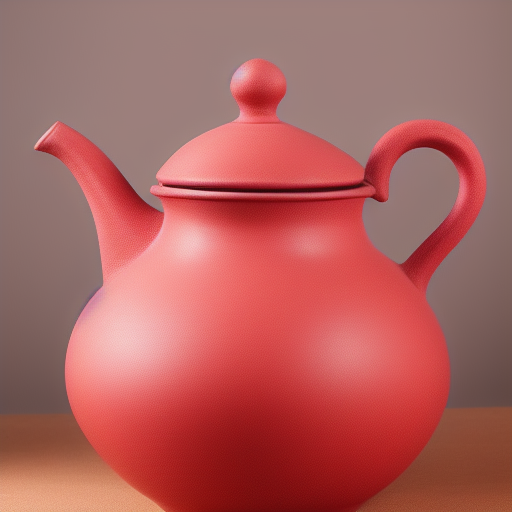
A useful image prompt names the subject, the setting and the visual decision you want to explore. In LumenForge, you can keep that prompt with the model, settings and result, then use the saved context for another version. This turns a promising image into a starting point you can revisit.
For a product concept, begin with the object and the kind of picture you need. A handmade teapot for a quiet editorial spread asks for different framing from a catalogue image. A short description that makes that distinction gives you something more useful to judge than a pile of attractive adjectives.
Start with a recorded example
This prompt was used in an actual LumenForge session.
Studio product photograph of a handmade red ceramic teapot on a pale stone table, soft window light, clean background, fine glaze texture
The recorded job used an SD 1.5 Q4_0 model, a 512 × 512 image, 25 steps, CFG 7, the DPM++ 2M Karras sampler and seed 882741587. These details make the example traceable. They give you a record of what was requested and the setup that produced the image.
Read the prompt as a set of decisions
| Part of the brief | What it asks for | What to inspect in the output |
|---|---|---|
| Handmade red ceramic teapot | A subject, colour and material | Shape, glaze and whether the object reads clearly |
| Pale stone table | A surface and setting | What the generated surface actually looks like |
| Soft window light | A lighting direction | Highlights, shadows and overall contrast |
| Clean background | A simpler composition | Whether the background leaves room for the subject |
In the example, the warm-toned surface is a useful thing to notice when the brief asks for pale stone. You can like the glaze and still decide that the surface needs another attempt. LumenForge’s workflow gives those two judgments somewhere to go.
Turn an observation into the next request
For a suggested next version, keep the teapot and write a more explicit setting request.
Handmade red ceramic teapot, full object visible on a cool pale limestone tabletop, simple light-grey background, soft window light, product photograph
“Full object visible” responds to the close crop. Naming the tabletop and background separately makes the spatial intention easier to discuss. This broader revision changes the crop and the setting together, giving the next generation a more explicit composition to interpret.
If the goal is to compare a particular change, preserve the model and the settings you can control. Record the seed too. The teapot examples shown in this series use different seeds, so the differences between them represent different complete generations.
Keep the brief attached to the work
LumenForge brings projects, model selection, prompts, queue and history into a native Mac workspace. That matters when a session produces one detail you want to keep. You can return to the result, inspect its context and prepare a deliberate variation without rebuilding the brief from memory.
Local image generation starts with compatible model files and enough memory for the selected job. LumenForge documents macOS 14 or later, Apple silicon and at least 16 GB of unified memory. Larger models and workloads need more resources.
Generation runs on the Mac. Model downloads contact their hosts, and the distribution channel can involve Apple services and diagnostics. Those setup and distribution details are described in the product’s privacy information.
The downloadable website preview has a free tier: unlimited watermarked images within its 1024-class resolution limit, three successful trial videos and one active job. Larger images, watermark removal, LoRA and batches require Pro. Pro purchasing is not open on the site yet; this download does not grant a Pro licence.
Explore LumenForge · Download the notarized Mac preview · High Road Software
Product workflow and requirements · Local generation and privacy