LumenForge / A practical guide
Explore three art directions from one local image brief
Use one product concept to explore editorial, graphic and atmospheric directions in LumenForge, with a recorded generated example.
To explore art direction, keep the product idea recognizable and give each version a distinct visual job. LumenForge lets you organize a project and compare results in history. In the free preview, run each direction one at a time; an existing Pro licence enables queued variations and batches. You can keep the useful direction close while developing the next one.
Imagine a fictional ceramics collection called Morning Objects. The first brief asks for a handmade blue teapot that will anchor a small campaign. Before choosing a final image, you want to see whether the collection feels better in an editorial scene, a clean graphic setup or a darker evening atmosphere.
Give the directions names you can use
For the editorial version, try a prompt that emphasizes daylight and material.
Handmade blue ceramic teapot, warm morning window light, a simple pale surface, three-quarter view, editorial product photograph
For a graphic version, make the framing and background more deliberate.
Handmade blue ceramic teapot, centered composition, clear silhouette, matte blue background, a single directional light, product concept
For an evening version, change the visual atmosphere.
Handmade blue ceramic teapot, low warm side light, quiet dark background, reflective glaze, intimate still-life photograph
These are suggested briefs for exploration. Their value is the choice each one puts in front of you. The editorial direction asks for an approachable scene. The graphic direction gives the silhouette more responsibility. The evening direction lets the glaze and highlights carry the image.
Inspect an actual LumenForge result
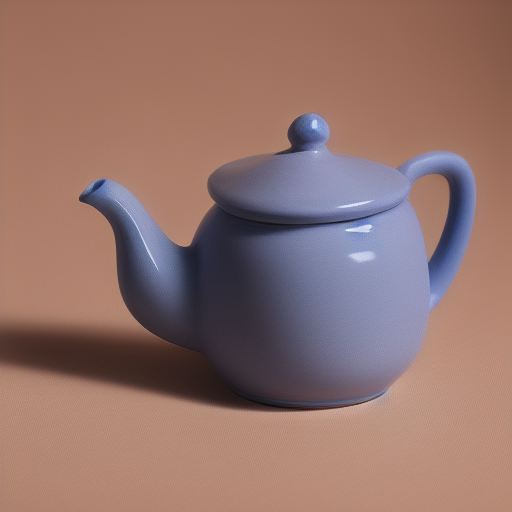
The pictured example used a related product-photograph brief.
Studio product photograph of a handmade blue ceramic teapot, warm morning light, pale stone background, three-quarter view
The job used SD 1.5 Q4_0, 512 × 512, 25 steps, CFG 7, DPM++ 2M Karras and seed 3990766028. The result gives you something specific to discuss. You might keep the glaze, prefer a lighter backdrop or choose a different crop for the campaign.
Use the queue to keep each experiment deliberate
With an existing Pro licence, prepare queued jobs with the prompt and settings you want each one to use. In the free preview, run and review each direction one at a time. The project provides a place for the session, while history provides a way back to the results. Pro purchasing is not open on the site yet.
For an art-direction pass, record the differences you intentionally introduced. For a tighter later comparison, reuse a saved setup and change one decision. The two approaches answer different creative questions. An exploratory pass finds promising territory. A closer comparison helps you refine it.
The samples in this series share core model and sampling settings but use different seeds and prompts. They show actual directions produced in the app and support a discussion of the images you see.
Choose for the layout you need
Try the preferred result in the intended layout before spending the whole session refining small details. A square image for a social concept may work differently from an image beside a long headline. Check where the eye lands, how the object reads at a small size and whether the composition leaves usable space.
The advantage of a project-based local workflow is that the decision can survive the session. Keep the chosen direction, its context and the next change together. You can return to it when the campaign needs another crop or a related idea.
LumenForge uses compatible local models on Apple-silicon Macs. Its documented starting requirements are macOS 14 or later and at least 16 GB of unified memory. Model selection and workload affect the resources and time required.
The downloadable website preview has a free tier: unlimited watermarked images within its 1024-class resolution limit, three successful trial videos and one active job. Larger images, watermark removal, LoRA and batches require Pro. Pro purchasing is not open on the site yet; this download does not grant a Pro licence.
Explore LumenForge · Download the notarized Mac preview · High Road Software
LumenForge project and queue workflow · Requirements and support