LumenForge / A practical guide
Keep a client visual brief local from reference to export
Follow a fictional product brief through local image generation, project history and a deliberate export in LumenForge.
A private image workflow needs a clear path for the reference material, prompt, generation, saved history and exported file. LumenForge processes supported generation on the Mac and keeps creative context in its project workflow. This gives you a practical way to explore a visual brief while choosing what you share afterward.
Imagine a fictional client developing a small ceramics collection. The name, colour palette and reference images are still working material. You want to explore a green-teapot direction before presenting a short selection. The first decision is where that exploration will happen.
Give the project a clear boundary
Start a project for the brief and use reference material you are authorized to work with. Keep the source files and a short description of the assignment together. If the selected LumenForge workflow supports a reference image, check what that model and workflow expect before attaching it.
For an early concept pass, a written prompt may be enough. A text-only direction gives you a way to explore material and light without introducing a client photograph into every attempt.
The app’s local-generation benefit is specific. Prompts and creative media are processed on the Mac in the supported local workflow. Model downloads contact their hosts, while TestFlight and Apple services have their own distribution and diagnostic activity.
A real example for the visual discussion
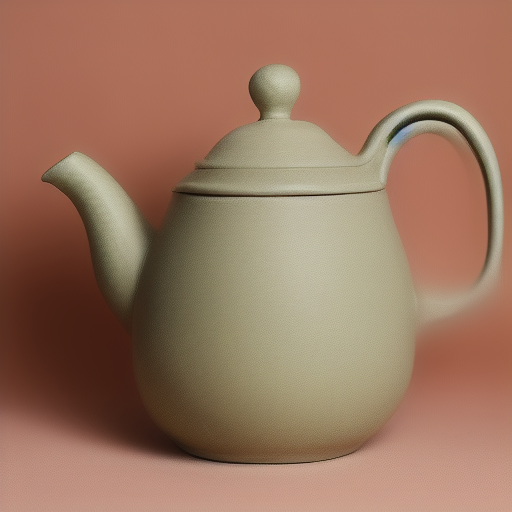
This recorded input describes a handmade green teapot.
Studio product photograph of a handmade green ceramic teapot, soft window light, pale stone background, front view
The saved settings identify SD 1.5 Q4_0, a 512 × 512 image, 25 steps, CFG 7, DPM++ 2M Karras and seed 3969040690. This is an exploratory image from a documented session. The fictional client scenario explains how you could use a local workspace to discuss that kind of direction.
Keep review decisions with the image
Look at the result against the brief. You may want the surface texture, a clearer green or a different background. Record the reason before preparing the next variation. A client presentation is easier to discuss when each selected image answers a visible creative question.
LumenForge keeps prompts, settings and history near the results. You can use that context to prepare another attempt, return to a previous choice or recover the setup when the brief changes. The benefit is continuity across the project.
For reference-based work, inspect the generated image for how it treated the source. Check the composition and any important object features at the size the client will see. Then select the image that communicates the concept you want to present.
Review the file that leaves the project
Creative context can be useful inside the project and unnecessary in a shared file. Before sending an output, inspect the export and any metadata or sidecar information you plan to include. Choose what the recipient needs to understand the concept, and keep private project notes with the working files.
That final check makes local processing part of a complete workflow. The project can retain the detailed context while you prepare a deliberate deliverable for someone else.
LumenForge documents Apple silicon, macOS 14 or later and at least 16 GB unified memory. Compatible model files and sufficient storage are also part of setup. Its project, queue and history tools are especially useful when a brief will be revised across several sessions.
The downloadable website preview has a free tier: unlimited watermarked images within its 1024-class resolution limit, three successful trial videos and one active job. Larger images, watermark removal, LoRA and batches require Pro. Pro purchasing is not open on the site yet; this download does not grant a Pro licence.
Explore LumenForge · Download the notarized Mac preview · High Road Software
LumenForge privacy information · Website preview and access guide