PRACTICAL GUIDE · SEPTEMBER 6, 2026
Copy a photo without opening the full Photos window.
PhotoClip is designed for the moment when a message, note or page needs one of your own images. Version 1.0 is still in preparation, so these steps describe the current candidate rather than a public download.
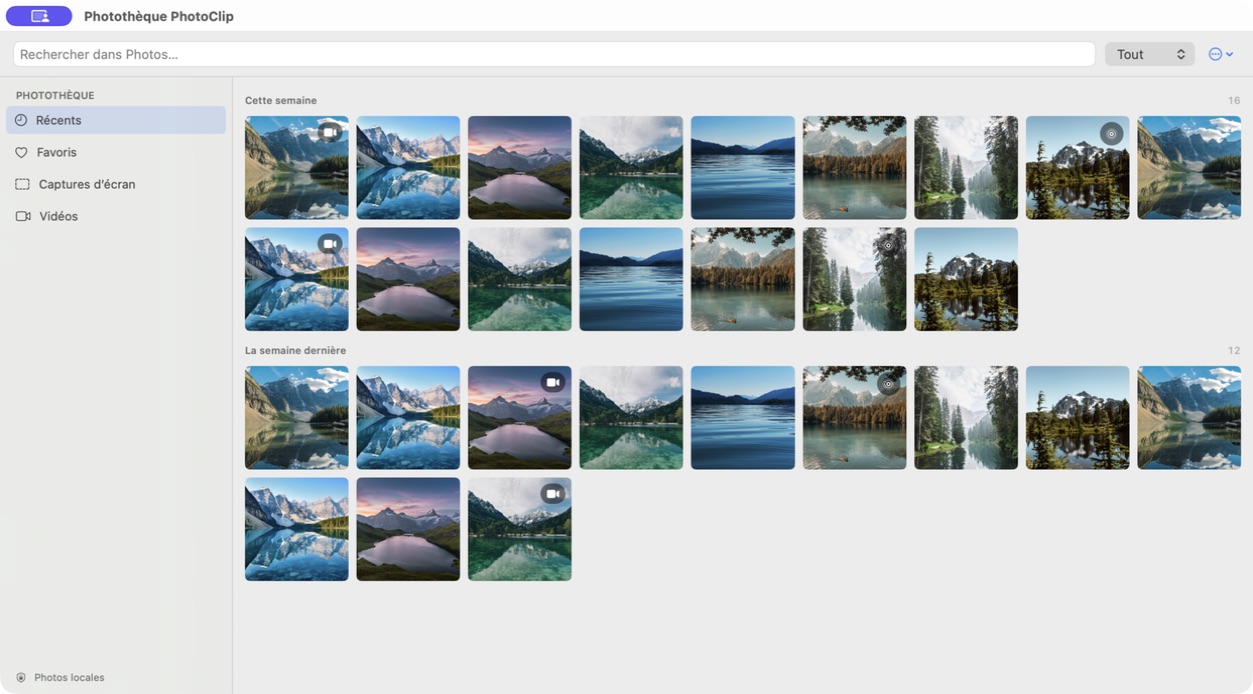
1. Open PhotoClip
Choose PhotoClip in the menu bar or press Option-Command-P. The library opens over the work already on screen.
2. Find the image
Browse recent items or use the Favorites, Photos, Videos and Screenshots filters. Search narrows the visible library.
3. Preview when needed
Double-click an item or press Space to inspect it before copying. Hold Command to make a multiple selection.
4. Copy or export
Choose Copy for a still image, then paste it into the destination app. Choose Export to save selected media to a location; videos use the export route.
What stays outside PhotoClip
Use Apple Photos to edit, delete, organize albums or manage the library. PhotoClip provides a compact access path and does not replace those features. Read Apple’s Photos User Guide for the complete library workflow.