PulseWave / A practical guide
Choose a breathing session by the moment, not by the biggest number
A direct guide to 30-, 60- and 120-second resets, longer sessions, comfortable pacing and the limits of what a timer can promise.
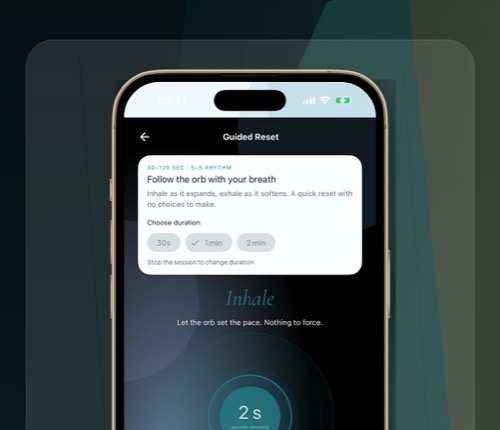
A 30-second breathing reset and a five-minute guided session are not smaller and larger versions of the same promise. They fit different moments. The shorter option reduces the effort required to begin; the longer option gives the rhythm time to become familiar.
PulseWave offers a Guided Reset with 30-, 60- and 120-second choices, plus a broader library of breathing sessions. The app can pace the breath, but it cannot decide which duration will feel comfortable or guarantee a particular outcome.
Choose the duration from the time and attention you actually have, not from the idea that a longer session must be more effective.
When does 30 seconds make sense?
Use 30 seconds when the main obstacle is beginning. It can fit between two tasks, before reopening a message thread or after noticing that you have been scrolling without deciding what to do next.
The goal is to follow one simple rhythm for a bounded interval. Sit or stand in a comfortable position, start the reset and let the visual cue carry the timing. Do not deepen the breath until it becomes effortful.
Thirty seconds is not a treatment and does not establish a lasting change. It is a small interruption you can finish. If breath focus feels uncomfortable, stop and return to normal breathing.
What changes at one or two minutes?
A minute gives you more time to understand the cue. Two minutes makes it easier to notice whether the pace remains comfortable after the novelty of the first cycles.
These durations work when you want more than a single pause but do not want to organise a separate practice session. They are also useful for learning the interface before trying a longer protocol.
Keep the first attempt simple. Choose one duration before pressing Begin and avoid treating the session like a score. If the pace feels too slow, breathe more lightly or stop.
When is a five-minute session useful?
Five minutes makes sense when you can put the phone somewhere visible, leave notifications alone and follow a steady cue without rushing back to the next screen.
The first minute may be mostly mechanical: finding the visual rhythm and a comfortable amount of air. The middle of the session can then feel more ordinary. The timer provides an end, so you do not need to count cycles.
A five-minute session is not automatically the correct starting point. If you keep abandoning it after 40 seconds, choose a shorter duration you will complete. You can lengthen the next session after the gesture becomes familiar.
Pick the rhythm separately from the duration
Duration answers “how long?” A breathing pattern answers “what pace?” PulseWave includes different protocols, and not every pattern will be comfortable for every person.
A steady 5–5 rhythm uses five seconds in and five seconds out. That works out to roughly six cycles per minute, but the number is a pacing reference, not a guarantee. Avoid forcing the lungs to fill or empty completely just to match the clock.
Patterns with holds add another demand. Skip breath holds if they are uncomfortable, and do not use a consumer app as a substitute for professional advice when a health condition affects breathing.
Make the end part of the session
When the timer finishes, let one breath happen without the cue. Notice whether you want to stand, continue normally or stop. Then decide what comes next before opening another feed.
The useful outcome can be as concrete as returning to one chosen task. Do not require the session to produce calm, sleep, focus or a change in heart-rate variability that you did not measure.
What does PulseWave store?
A breathing session is part of a wider app that also includes optional reflection and subscription functionality. PulseWave uses an anonymous Firebase identity and RevenueCat for requested account and subscription functions. Journal and mood entries stay on the device by default and sync only after separate consent.
That is a specific boundary, not “no data collected.” Read the PulseWave privacy policy for the current details.
Choose 30 seconds if beginning is the hard part, or a longer session when you can give the rhythm room. Stop if it feels uncomfortable.